
CASE STUDY · RELICANA · 2026
Jalisco Salt:
Bilingual Reading System
Jalisco Salt:
Bilingual Reading System
Designing the content model, interaction system, and adaptive reading modes for a dual-language EN/ES ebook where the reader controls which language is in focus.
Designing the content model, interaction system, and adaptive reading modes for a dual-language EN/ES ebook where the reader controls which language is in focus.
Designing the content model, interaction system, and adaptive reading modes for a dual-language EN/ES ebook where the reader controls which language is in focus.
Try It
The Engagement
My Role
Content Designer
Format
ePub3 / PDF Ebook
Audience
English and Spanish speakers learning each other's language
Platform
Apple Books, Kobo, PDF
Domain
Content Design, Reading UX, Language Learning
Status
Concept – interactive prototype complete
The Premise
Most bilingual reading tools make the choice for you. Jalisco Salt puts the reader in control – of which language leads, how much support they see, and when they're ready to read without it.
Jalisco Salt is a bilingual EN/ES novella published under Relicana. Rather than hiding one language behind a toggle or separating it into a parallel document, both languages are always a tap away – with the reader choosing which one leads.
The design challenge: how do you give a reader control over two languages on the same page without one overwhelming the other, without the eye constantly jumping between competing text, and without the experience feeling like a study exercise?
The Format Problem
The project started as a PDF – static, linear, with no interactive layer. No toggles, no live adjustments. In a web app, switching a reader's language preference is instant. In a PDF, every hierarchy decision is permanent from the moment you export.
That constraint turned out to be useful. When the format can't carry design intent, the content structure has to carry all of it. The hierarchy between languages, the support for learners, the pacing of the reading experience – all of it had to live in the text itself.
The project evolved from a static PDF concept into an interactive ePub3 experience – the format that makes everything in this prototype possible, supported natively by Apple Books and Kobo.
Content Model
Three layouts were considered for how the two languages would share the page.
Parallel columns – English left, Spanish right – breaks when sentence lengths diverge. Spanish consistently runs 15–20% longer than English. The layout falls apart within a few paragraphs.
Stacked blocks – full English paragraph, then full Spanish – is readable but puts too much distance between the two versions. The reader has to hold one in memory while reading the other.
Alternating sentences – each English sentence followed immediately by its Spanish equivalent – keeps both languages close together and mirrors how bilingual reading comprehension actually develops.
Alternating sentences was selected. Reading both languages demands more attention – that was a deliberate choice. This is designed for readers who want immersion, not a reference document.
Reading Modes
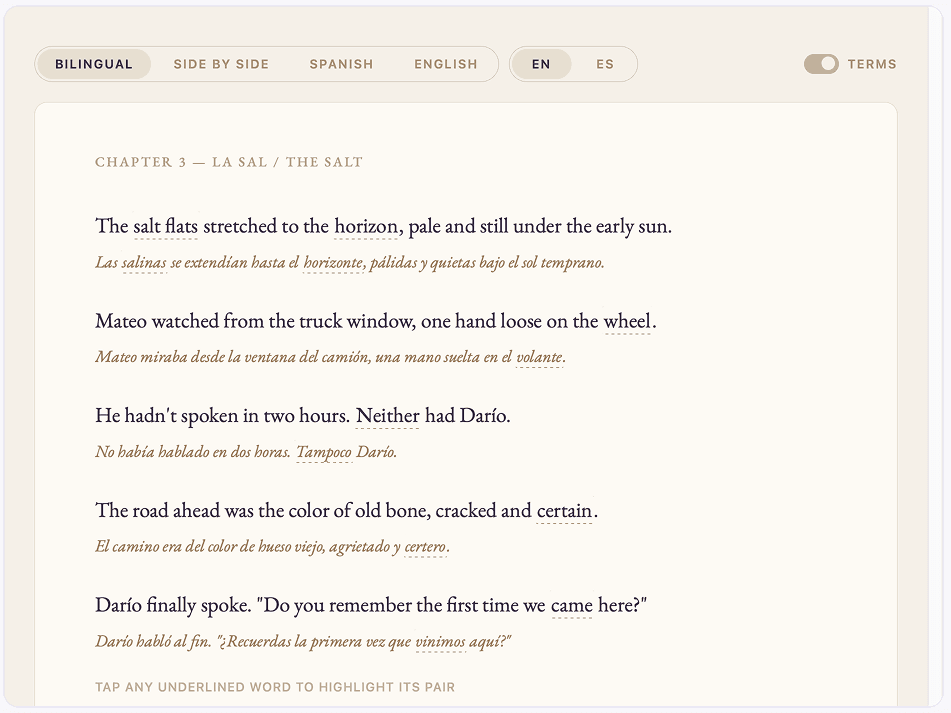
Four modes, one underlying text. The EN/ES toggle controls which language is dominant. In Side by side mode, the right column is always the primary read.
Bilingual
English and Spanish alternate sentence by sentence. The EN/ES toggle controls which language appears first and larger, and which sits below it in a smaller, warmer tone.
Side by side
Two columns. Right column is always the dominant language at full size. Left is always the supporting reference. The reader's eye naturally travels left to right and lands on the right – so the primary language always sits where attention arrives.
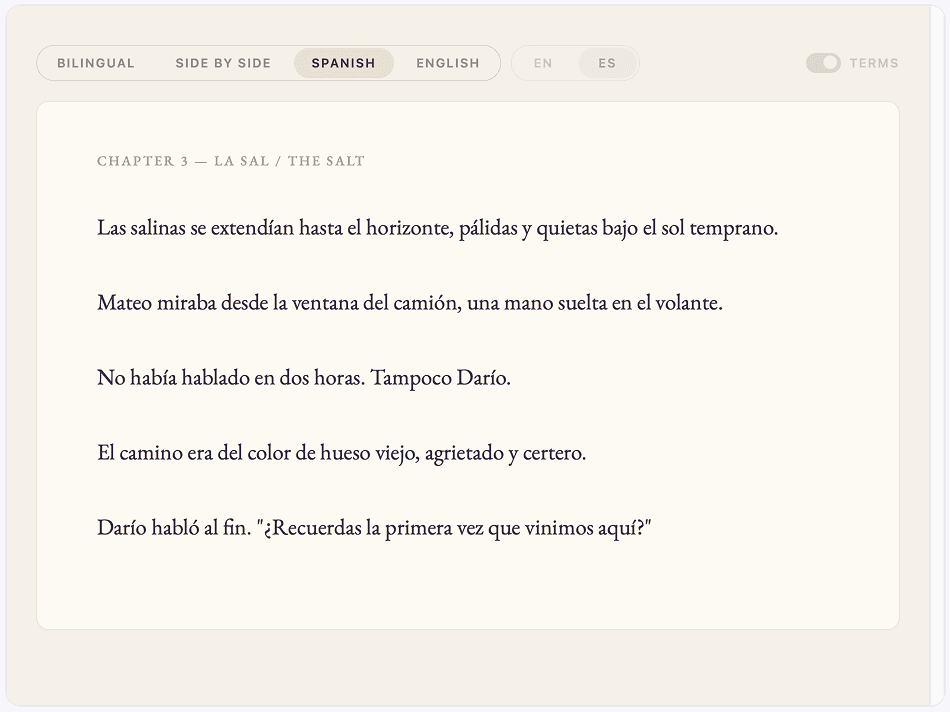
Spanish only / English only
Single language, clean page, no paired text. Controls that don't apply to the current mode dim rather than disappear, so the reader understands the system rather than feeling lost.
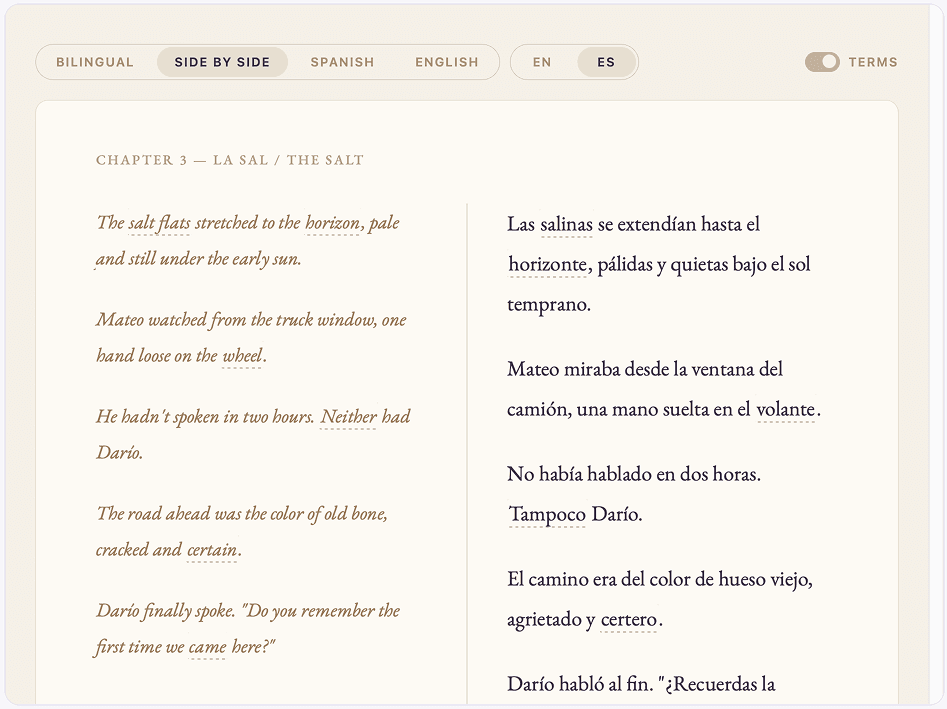
Column headers were removed during testing. The EN/ES toggle already tells the reader which language is dominant. Repeating it as a label on the page was noise.
Key Design Decisions
01
Right column is always dominant
Eye-tracking research on left-to-right reading languages consistently shows that the eye sweeps right and settles – the right side is where attention lands, not where it starts. Studies on parallel-text reading, including bilingual book editions, show readers naturally treat the right column as the primary read and the left as reference. Placing the dominant language on the right works with that established pattern rather than against it.
02
The toolbar communicates, the page reads
Every control has one job: tell the reader what mode they're in. The page has one job: be readable. When those two things overlap, the page gets cluttered. Column headers were cut because the EN/ES toggle already does that work.
03
Language support is optional
Underlined word pairs can be turned on or off. When on, tapping any underlined word highlights its equivalent in the other language. Advanced readers turn them off. Beginners keep them on. The reader decides how much help they want.
04
Controls dim, not disappear
In single-language modes, controls that don't apply fade rather than vanish. This keeps the interface predictable – the reader always knows what's available and what isn't, rather than wondering where a control went.
Next Steps
Early testing with small groups of readers validated the core interaction model – the language toggle, the word pairing system, and the four reading modes all performed intuitively without instruction.
Expand the word pairing system to a full chapter – the prototype pairs six terms. A full chapter would surface dozens, requiring a structured content workflow to scale.
Test with beginner and intermediate learners separately to understand where comprehension holds across longer reading sessions and at what point single-language mode feels like progress rather than a loss of support.
Package the prototype as a distributable ePub3 file for Apple Books and Kobo. The system is built in HTML, CSS, and JavaScript – distribution is a packaging step, not a design one.